








Skip to content

School management & teacher attendance software Teachers on time. Classes delivered. Pay that adds up.

HAWA connects wall-mounted biometric terminals to a complete school management platform for universities, secondary schools and primary schools. Teacher attendance, timetables, course coverage and payslips all start from the same fingerprint.

See how it works

Used every school day by 20 universities and schools around the world

Trusted by 20 universities and schools around the world

  • Institut Les Baobabs, Senegal
  • Groupe Scolaire Atlas Horizon, Morocco
  • Université Privée Lagune-Sud, Côte d’Ivoire
  • Collège Bilingue Les Manguiers, Cameroon
  • Acacia Ridge Academy, Kenya
  • Harmattan Polytechnic Institute, Nigeria
  • École Primaire Les Flamboyants, Benin
  • Imena Hills Academy, Rwanda
  • Complexe Scolaire Étoile du Fleuve, DR Congo
  • Maple Grove Collegiate, Canada

One system for everyone who walks into school

Directors see what is really taught, administrators stop fighting spreadsheets, teachers see their hours and pay, and students know where their next class is.

Directors

Directors see what is really being taught

Coverage per course, class and teacher in one report, so decisions are based on hours delivered, not hours planned.

  • Course coverage at a glance
  • Payroll cost matched to hours taught
  • Every change traceable
Administration and HR

The office stops rebuilding the week by hand

Timetables that can’t overlap, attendance that fills itself in, and payslips that are ready when the period closes.

  • Conflict-free scheduling
  • Manual correction when a terminal is down
  • One-click academic year rollover

Teachers

Teachers know their hours and their pay

One touch on the terminal shows the next class, the hours already worked and an estimate of the next pay.

  • Next class, room and time
  • Coverage of each session
  • Estimated next pay

Students

Students always know where to be

Notifications tell students about their scheduled classes and any change, so fewer hours are lost to confusion.

  • Class reminders
  • Change alerts
  • The same timetable the school uses

Learn HAWA in short videos

From installing the first terminal to printing payslips: watch how it works.

All video tutorials

Everything school life needs, from the first bell to the last payslip

Six modules share one database, so a fingerprint at 07:58 updates the timetable, the course balance and the payslip without anyone typing it twice.

Biometric attendance

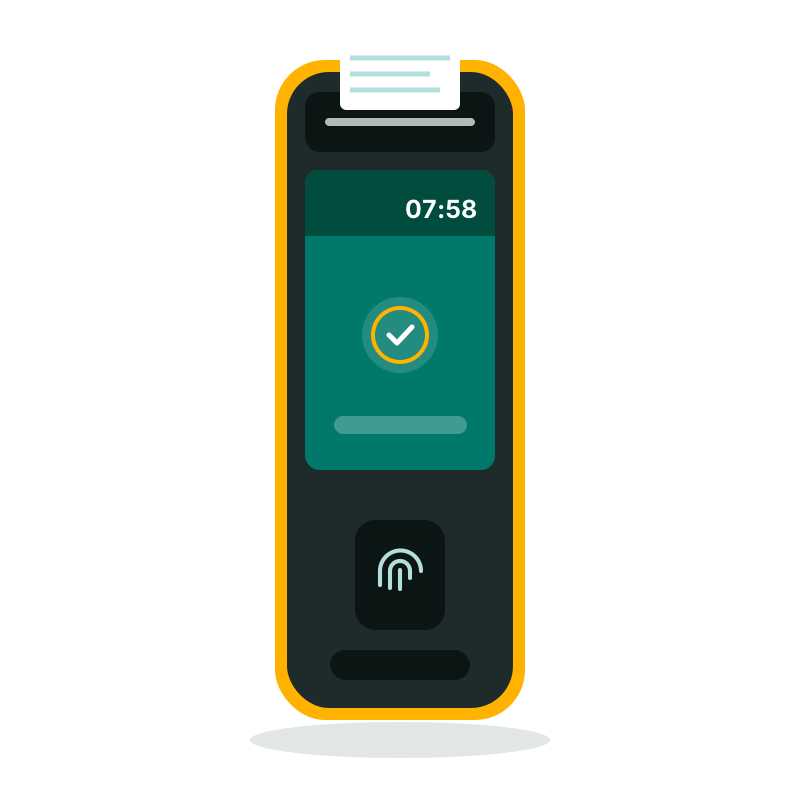
Teachers badge in and out on wall-mounted Android terminals. HAWA matches every badge to the class that was scheduled.

  • Check-in and check-out by fingerprint

    Every arrival and departure is recorded on the terminal and matched to the teacher’s scheduled class, room and time slot.

  • Grace periods you control

    Set how many minutes of lateness are tolerated so a short delay is not counted against a teacher.

  • Self-service on the wall terminal

    After badging, teachers see the hours they’ve worked, their upcoming classes and what their next pay will look like.

Explore these features

Timetables without overlaps

Place teachers, classes and rooms on the timetable. HAWA refuses any slot where two of them would collide.

  • Conflict-free scheduling

    Assign courses to classes, teachers and classrooms. HAWA blocks any overlap between teachers, classes or rooms before it happens.

  • Academic year rollover

    Move to a new academic year in a few clicks, keep your teachers and settings, and change only what’s different.

Explore these features

Course coverage and fraud control

Know exactly how much of each session and each course was really taught, and spot missing hours before they are paid.

  • Session coverage in percent

    For a 4-hour session, arriving and leaving on time gives 100%. Otherwise HAWA shows the exact share of the session covered.

  • Course volume tracking

    For a 40-hour course, every session taught is deducted from the total so you always know what’s delivered and what’s left.

  • Reversible actions

    Fraudulent or accidental entries can be reversed, with a history of what changed and who changed it.

Explore these features

Teacher payroll

Payslips are generated from hours actually taught multiplied by the right rate for the course, level and semester.

  • Automatic payslips

    HAWA multiplies the hours actually taught by the teacher’s rate and generates ready-to-print payslips.

Explore these features

Staff and student attendance

Beyond teachers, HAWA tracks non-teaching staff and student attendance class by class, on the same terminals and in the same reports.

  • Non-teaching staff attendance

    Administrative, library, accounting, reception and support staff badge on the same terminals. Track arrivals, departures and hours, with the same grace periods and reports as teachers.

  • Student attendance, class by class

    Record which students attended each session, by fingerprint, card or class list. HAWA links every check-in to the scheduled class, room and teacher, and computes an attendance rate per student and per class.

Explore these features

Notifications

Teachers and students are reminded of their classes, and told straight away when something changes.

  • Teacher class reminders

    Teachers are notified about their scheduled classes, so nobody walks into the wrong room at the wrong time.

  • Student schedule notifications

    Students receive notifications about their scheduled classes and any change to them.

Explore these features
  • Teacher class reminders
  • Student schedule notifications

School administration and reports

Buildings, classrooms, school structure, users, HR history and every report the office needs, all in one admin panel.

  • Reports for every question

    Print reports on badge events, late arrivals, early departures, coverage and hours, by teacher, class, course or period.

Explore these features

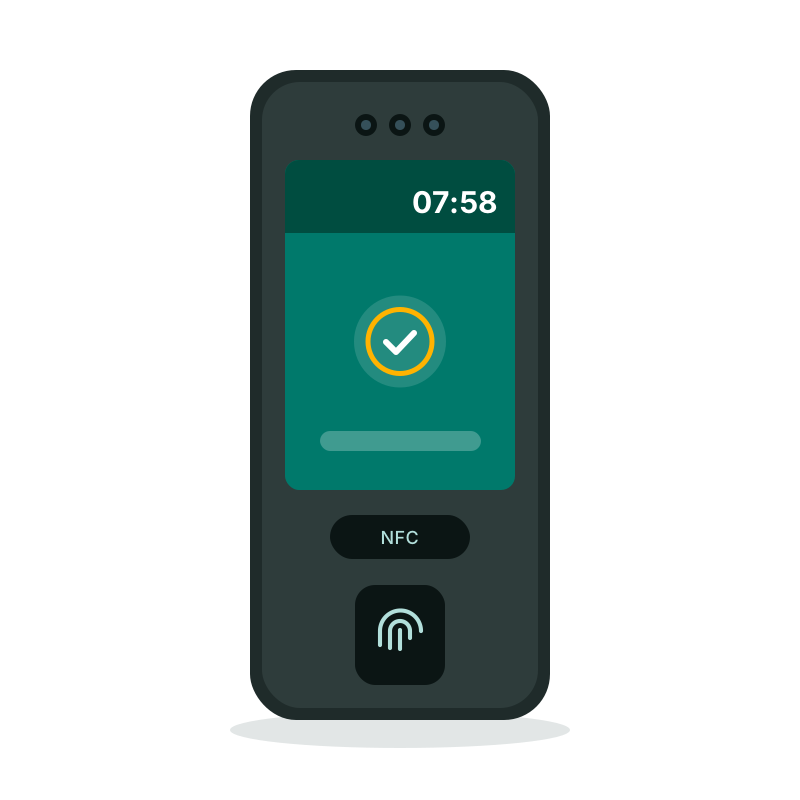
Fingerprint, NFC card or face: each school chooses how teachers badge

HAWA works with several authentication methods, so every campus gets the right balance of speed, comfort and security.

  • Fingerprint

    The surest way to stop badging for a colleague: a fingerprint can’t be lent or shared.

    • FBI and ISO certified sensors on most terminals
    • Up to 20,000 fingerprints per terminal, depending on the model
    • No card to lose or forget
  • NFC / RFID card

    A quick tap of a badge, for staff who can’t use fingerprints or as a second check.

    • 13.56 MHz Mifare/NFC and 125 kHz cards, depending on the terminal
    • Cards printed with your school logo on request
    • Can be combined with fingerprint or face
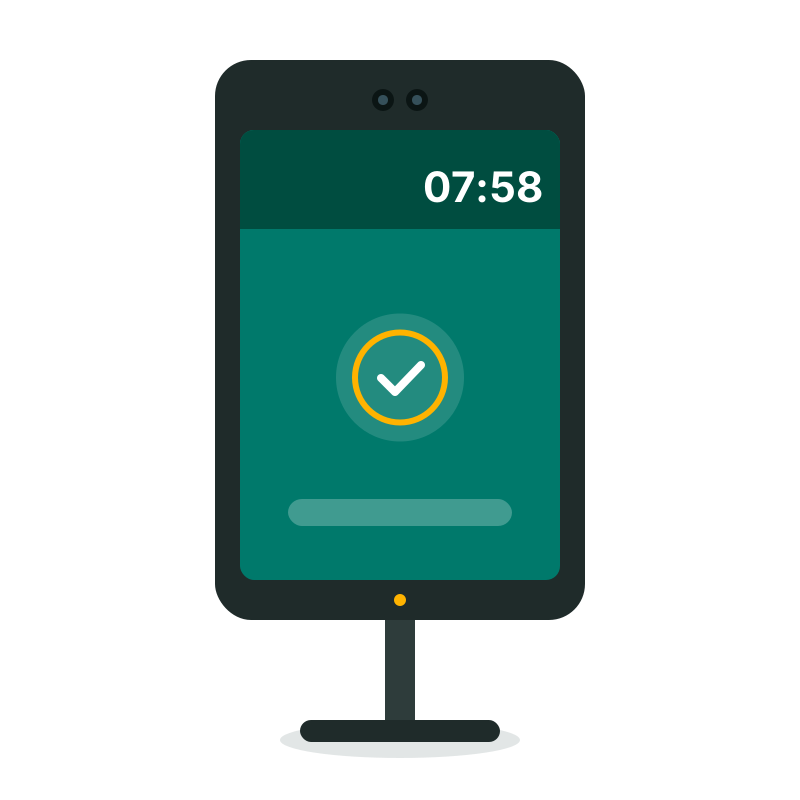
  • Face recognition

    Contactless and fast, ideal for busy entrances in the morning.

    • Live detection with infrared cameras rejects photos and videos
    • Recognition at a distance, without touching the terminal
    • Several people recognized at once on 8-inch terminals
  • Iris, palm and combined modes

    On compatible terminals, add iris or palm vein recognition, or require two methods for sensitive roles.

    • For example face + card, or fingerprint + card
    • The right level of security for each building

HAWA in numbers

schools and universities using HAWA
20
interfaces: admin panel and wall terminal
2
languages across the whole platform
2
fingerprint for attendance, coverage and pay
1

Up and running in four steps

Most schools go from installation to their first automatic payslips within one pay period.

  1. 01

    Set up your school

    Add buildings, classrooms, levels, classes and courses, or import them from your current lists.

  2. 02

    Enroll your teachers

    Create teacher profiles with their rates, then enroll each fingerprint on the wall terminal.

  3. 03

    Build the timetable

    Place courses in classes and rooms. HAWA stops any overlap as you go.

  4. 04

    Badge, track, pay

    Teachers badge in and out. Coverage, reports and payslips follow automatically.

On the admin panel and on the wall

Two interfaces, one source of truth: the admin panel for the office, and the Android terminal app teachers use every day.

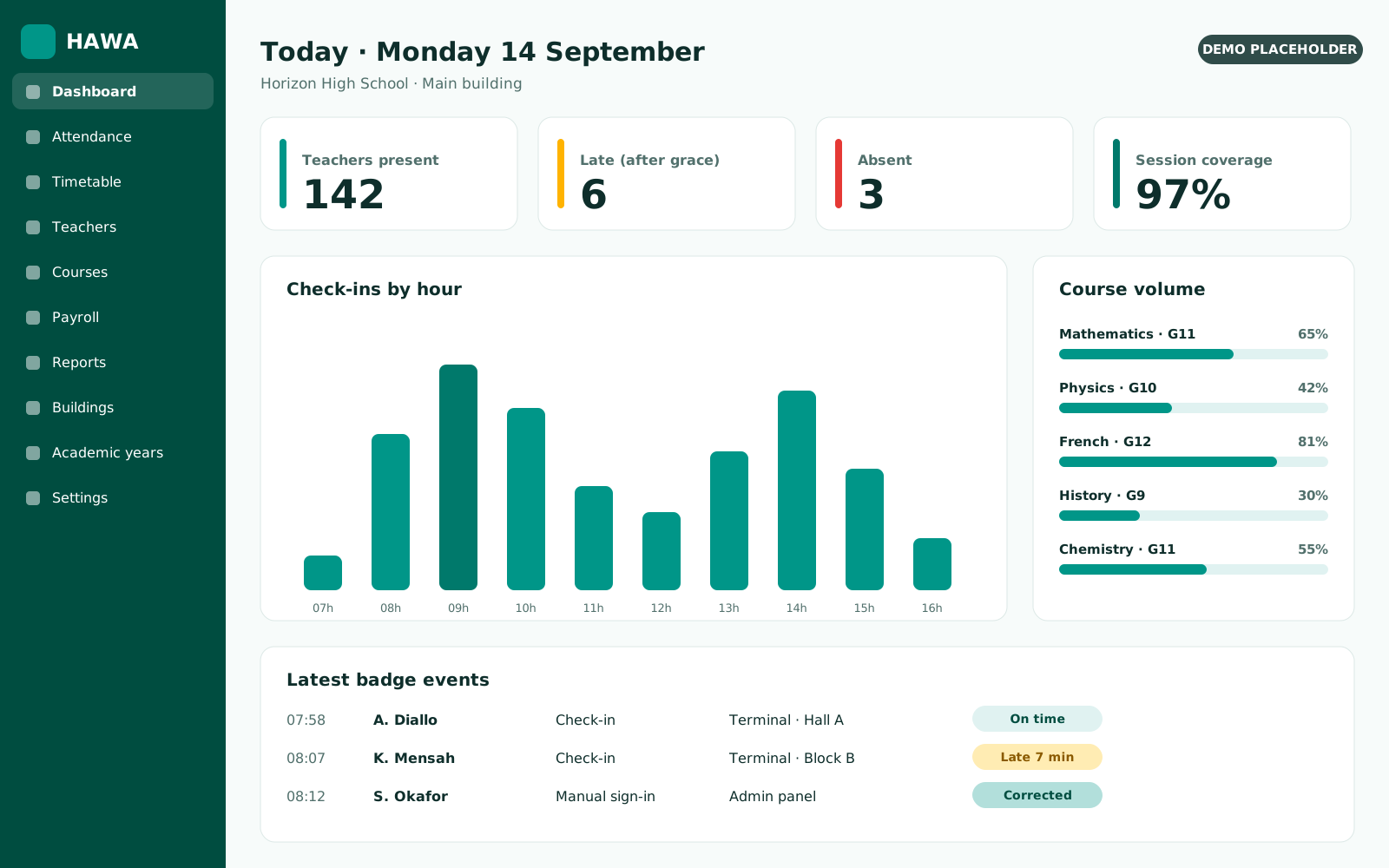
  • Daily attendance dashboard
    Admin panel Daily attendance dashboard Who is in, who is late and which classes are running right now.
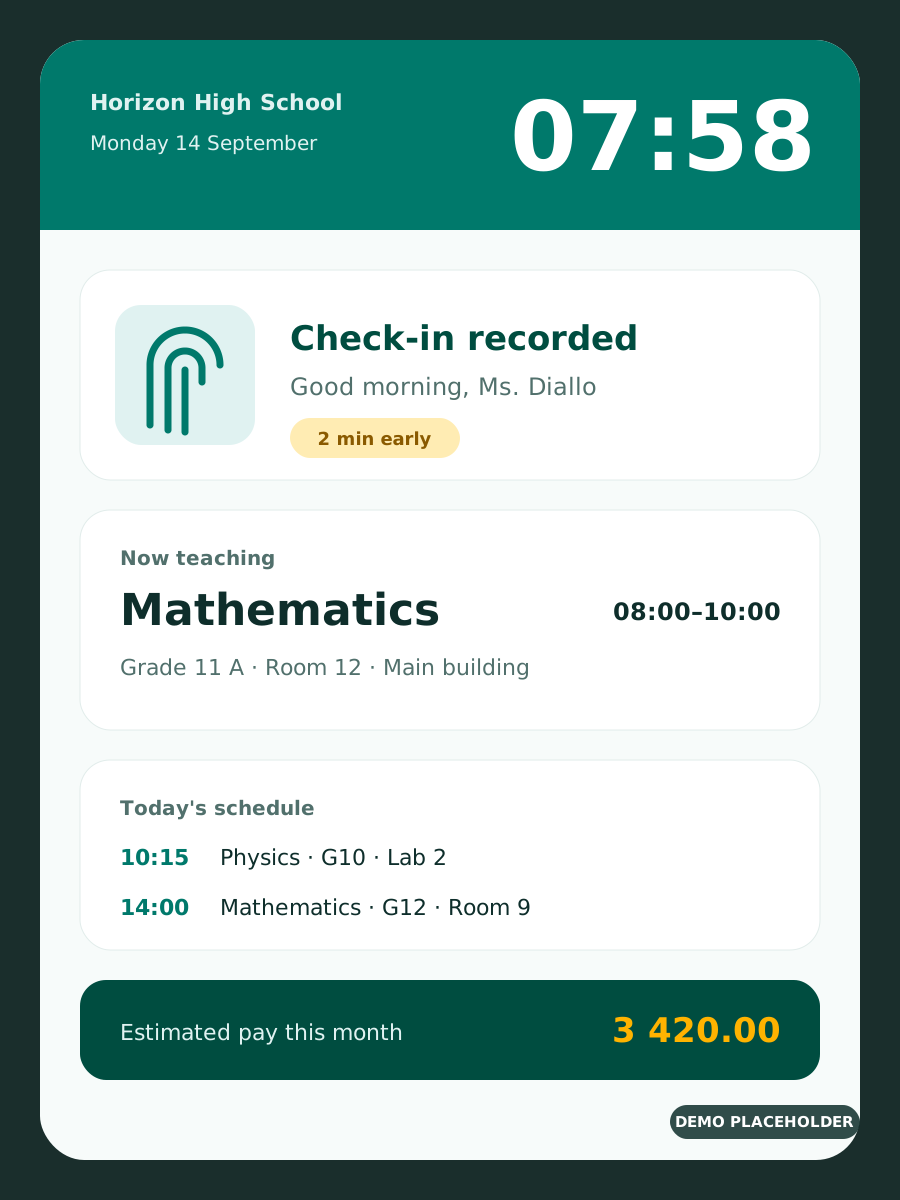
  • Check-in on the terminal
    Wall-mounted terminal Check-in on the terminal Teachers badge and see their next class immediately.
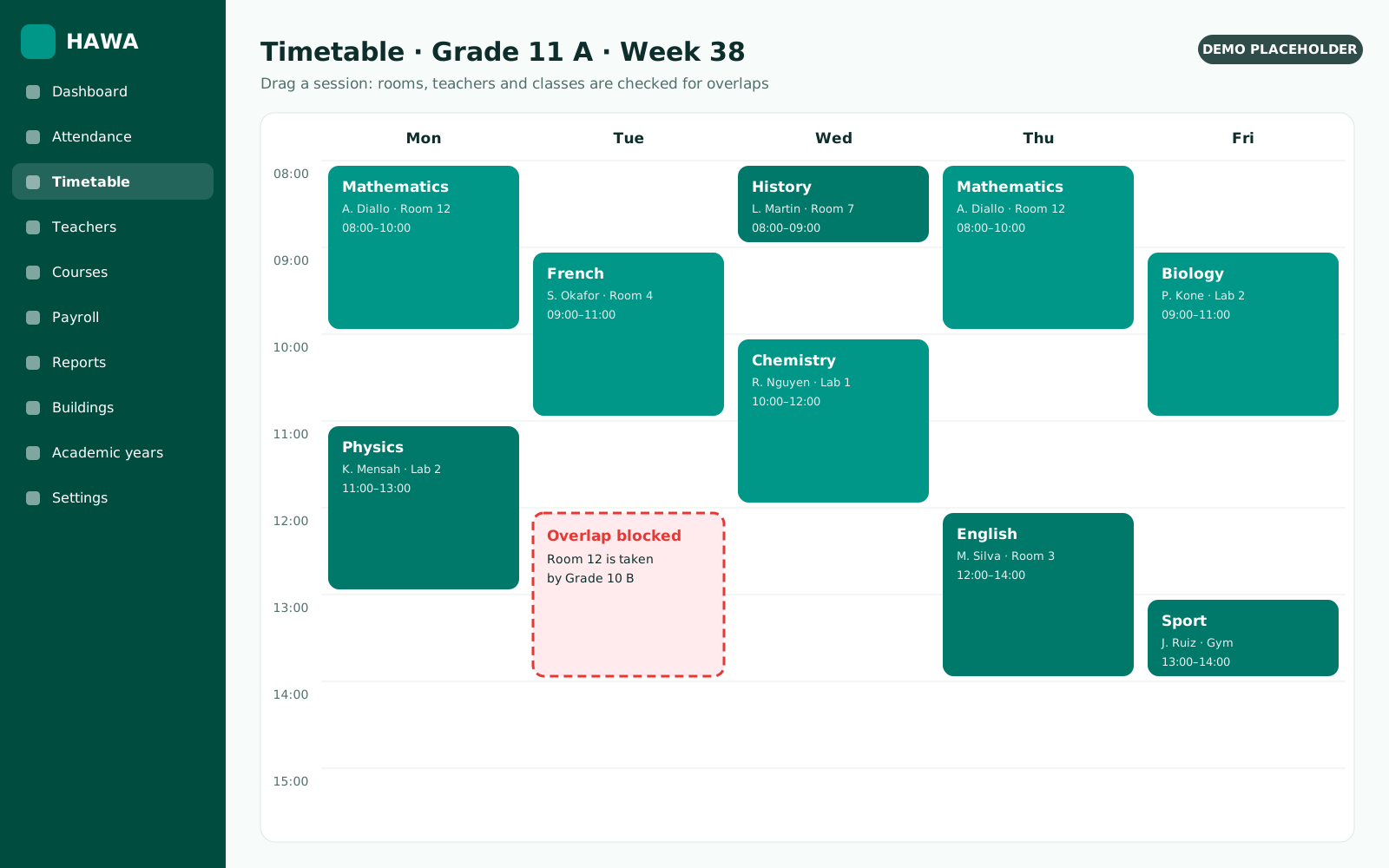
  • Timetable builder
    Admin panel Timetable builder Overlaps between teachers, classes and rooms are refused.
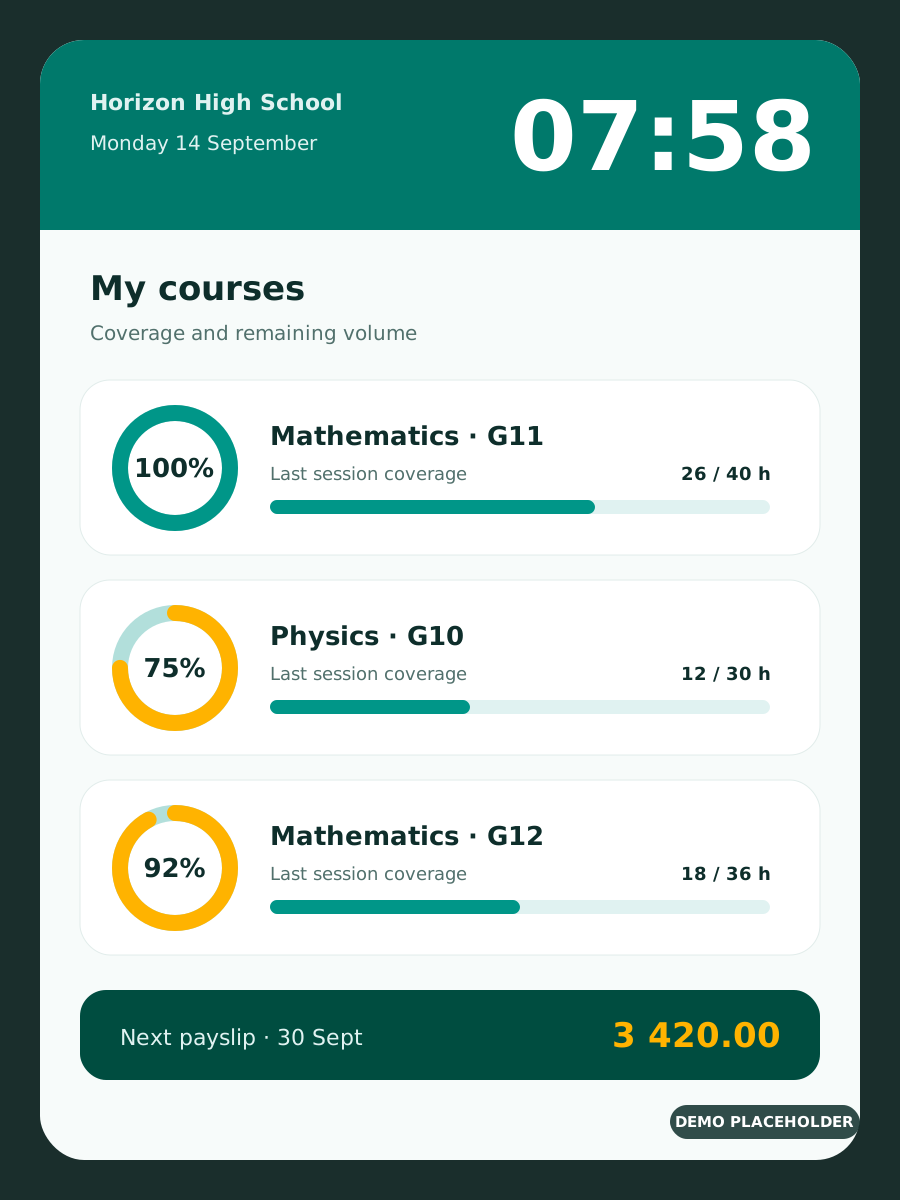
  • Coverage and pay on the terminal
    Wall-mounted terminal Coverage and pay on the terminal Course progress and estimated next pay, for each teacher.
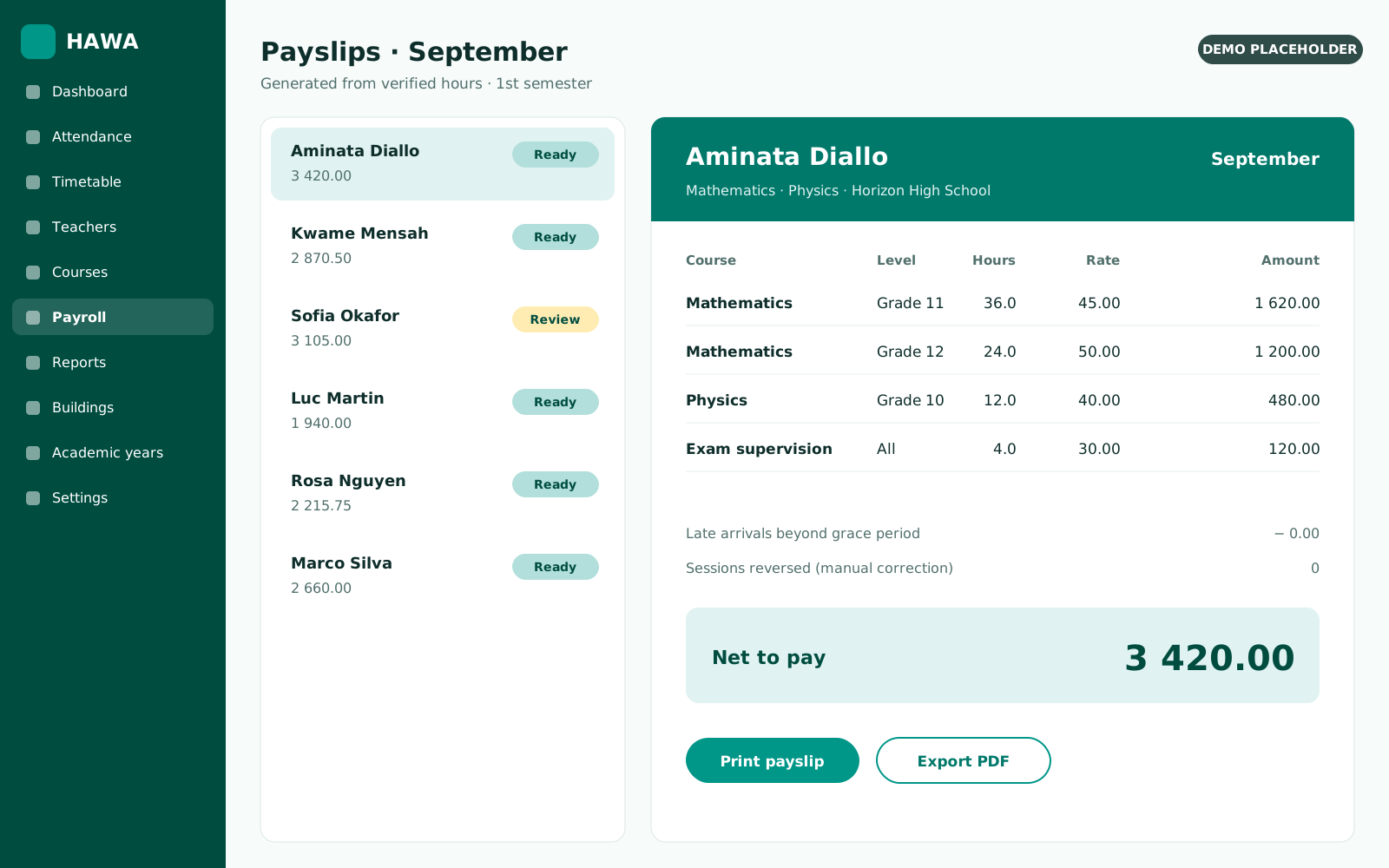
  • Payslip generation
    Admin panel Payslip generation Hours taught multiplied by the right rate, ready to print.

Every hour accounted for

Attendance, coverage, payslips and payroll summaries — generated on demand for any period, class or teacher, ready to print or export.

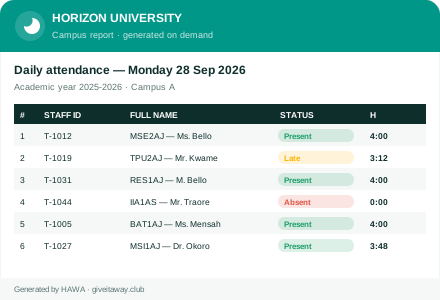
  • Attendance reports

    Who was present, late or absent, per day, class or building.

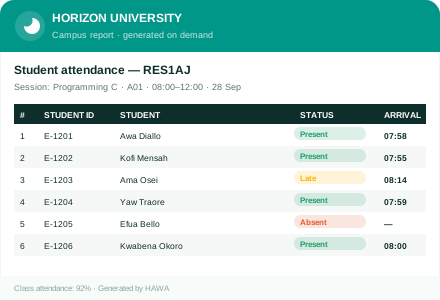
  • Student attendance

    Present, late or absent per session, with an attendance rate per student and class.

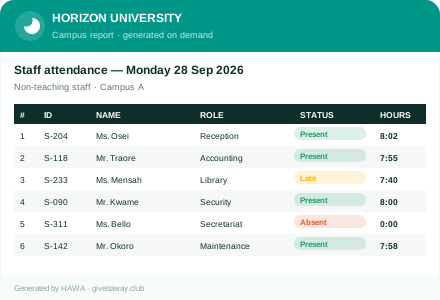
  • Non-teaching staff

    Arrivals, departures and hours for admin, library, reception and support staff.

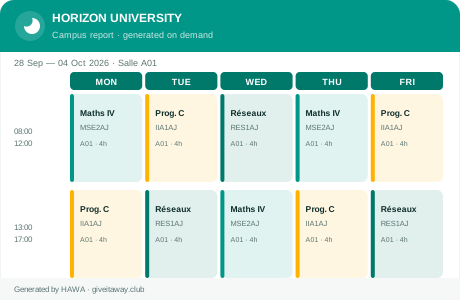
  • Weekly timetables

    Clear per-class schedules, printable and always up to date.

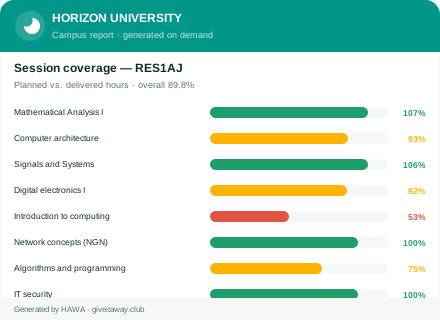
  • Course coverage

    Planned vs. delivered hours and the coverage rate for every course.

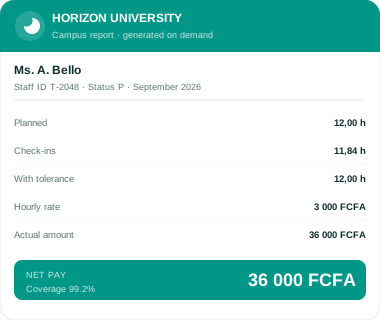
  • Payslips

    Pay from real hours, with rates and tolerance, ready to print.

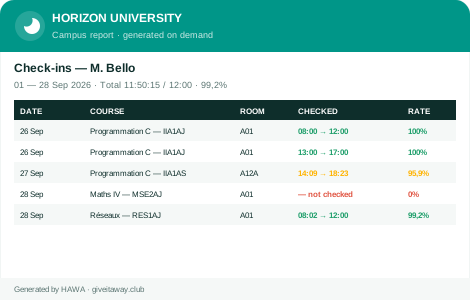
  • Check-in listings

    Every badge event, filterable by teacher, class, course or period.

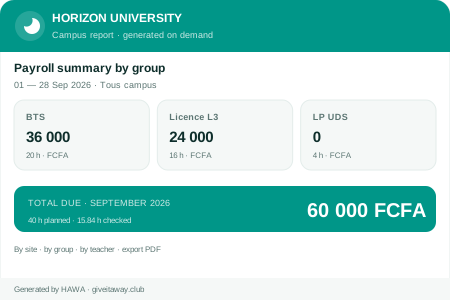
  • Payroll summaries

    Totals by group, site or level, exportable for accounting.

Reports on demand

Choose the period and the filters; every report is generated instantly and can be printed or exported.

Get a free demo
  • Attendance reports

    Attendance reports

  • Student attendance

    Student attendance

  • Non-teaching staff

    Non-teaching staff

  • Weekly timetables

    Weekly timetables

  • Course coverage

    Course coverage

  • Payslips

    Payslips

  • Check-in listings

    Check-in listings

  • Payroll summaries

    Payroll summaries

Sample reports with fictional data, shown for illustration.

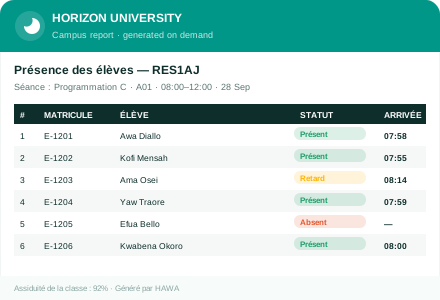
Track student attendance, class by class

The same terminals that clock your teachers also record which students attended each session — with an attendance rate per student and per class, and same-day alerts to families.

  • Fingerprint, card or class list

    Students check in the way that suits your school — biometric, RFID card, or the teacher marking the class list on screen.

  • Same-day alerts to families

    When a student is absent, parents can be notified automatically by SMS, WhatsApp or email — so nothing slips through.

  • Attendance rate per student & class

    Every check-in is linked to the scheduled class, room and teacher, giving you clear rates and printable class registers.

  • Fights truancy and fraud

    Biometric check-in means a student can’t sign in for an absent friend — attendance records you can trust.

Example student attendance class register

Sample class register with fictional data.

1

Students check in

At the classroom terminal or on the teacher’s device, in seconds, at the start of each session.

2

HAWA records & links it

Each presence is tied to the class, room and teacher from the timetable, automatically.

3

You get reports & alerts

Class registers, per-student rates, and automatic absence notifications to families.

Not just teachers — your whole team

Admin, library, accounting, reception, security and support staff badge on the same terminals — tracking arrivals, departures and hours, with the same reports and payroll, and no extra hardware.

Example non-teaching staff attendance sheet

Sample staff sheet with fictional data.

  • Every role, one system

    Administrators, librarians, accountants, reception, security and support staff — all on the same terminals as your teachers.

  • Arrivals, departures & hours

    Accurate clock-in and clock-out with grace periods, so you know exactly who was present and for how long.

  • Reports & payroll included

    The same coverage reports and payslips you get for teachers, broken down by person, role or department.

  • No extra hardware

    Staff attendance runs on the terminals you already have for teachers — nothing more to buy or install.

Become a HAWA partner

Resell and manage HAWA for schools in your region — with your own partner dashboard, recurring revenue, and our support behind you.

Recurring revenue

Earn on every school you bring on and renew, with transparent partner pricing.

Your own dashboard

Manage all your schools, devices and contacts from one partner portal.

We support you

Training, materials and technical help so you can deploy with confidence.

Become a partner

Resellers, integrators and distributors welcome.

What changes in the first term

Classes start on time

  • Teachers see their schedule on the terminal every time they badge
  • Late arrivals and early departures appear in reports the same day
  • Grace periods keep the rules fair

Payroll without recounting

  • Payslips come straight from validated hours
  • The right rate per course, level and semester
  • Teachers can check their estimate before payday

Every hour accounted for

  • Course volumes decrease session by session
  • Missing or shortened classes stand out
  • Mistakes and fraud can be reversed with a full history

Order terminals and licences online

Request an estimate in a few clicks, accept it online and follow your order from production to delivery.

See all products

Schools that stopped counting hours by hand

We used to discover missing hours at the end of the semester. Now I see course coverage every morning and fix problems the same week.

Aminata Sow Director of Studies · Institut Les Baobabs · Senegal

Payslips took three of us four days. With HAWA they are generated from real hours and checked in an afternoon.

Karim Benali Administrative Director · Groupe Scolaire Atlas Horizon · Morocco

The overlap check alone was worth it. Two rooms booked for the same class simply can’t happen anymore.

Julie Tremblay Timetable Coordinator · Maple Grove Collegiate · Canada

Teachers check their hours on the terminal before payday, so disputes have almost disappeared.

Emmanuel Ndong Principal · Collège Bilingue Les Manguiers · Cameroon

Rolling over to the new academic year took a morning instead of a month. Our teachers and rates were already there.

Grace Wanjiru HR Manager · Acacia Ridge Academy · Kenya

A 40-hour course now shows exactly how many hours are left. Our department heads plan catch-up sessions before exams, not after.

Yao Kouassi Academic Secretary General · Université Privée Lagune-Sud · Côte d’Ivoire

When a terminal was damaged during works, we recorded sign-ins from the admin panel and lost nothing.

Chinedu Okeke Vice Principal · Harmattan Polytechnic Institute · Nigeria

Setup was straightforward, and having both interfaces in French and English mattered for our staff.

Patrick Mbuyi IT Manager · Complexe Scolaire Étoile du Fleuve · DR Congo

Guides for school leaders

Methods and checklists to improve punctuality, timetables and payroll.

All guides

Questions schools ask us

Another question?

Write to our team
Which terminals does HAWA run on?

HAWA’s terminal app runs on wall-mounted Android biometric terminals. Tell us which hardware you have and we’ll confirm compatibility during the demo.

What happens if a terminal stops working?

Authorized administrators can record sign-in and sign-out from the admin panel. Coverage and pay are recalculated as usual.

How is session coverage calculated?

HAWA compares badge times with the scheduled slot. Arriving and leaving on time, within your grace period, gives 100%. Otherwise you see the exact share of the session covered, and course totals decrease accordingly.

Can we correct mistakes or cancel fraudulent badges?

Yes. Actions can be reversed, and HAWA keeps a history of what changed and who made the change.

Do we have to start over each academic year?

No. You switch to the new year and keep your teachers, rates and structure. Only what changes needs editing.

Is HAWA available in French and English?

Yes. The admin panel, the terminal app and this website are all bilingual.

Is HAWA available in my country?

Yes. HAWA works for universities, secondary schools and primary schools worldwide, and our team supports you in French and English by phone and email.

Can HAWA pay part-time lecturers by the hour?

Yes. You set hourly rates per course, level and semester. Each payslip multiplies the hours actually taught, as recorded on the terminal, by the right rate.

Can HAWA track non-teaching staff, not just teachers?

Yes. Administrative and support staff badge on the same terminals, and you get attendance, punctuality and hours reports for them, by role or department.

Can HAWA take student attendance for each class?

Yes. Each check-in is linked to the scheduled class, room and teacher, so you get a present/late/absent status per session and an attendance rate per student and per class, with printable class registers.

See HAWA running on your own timetable

In a 30-minute call we load a sample of your classes and show coverage, reports and payslips live.

We use necessary cookies to run this site. With your permission we also load external media (fonts and YouTube videos) and, if enabled, audience measurement. Learn more

Choose by category